
The UID number has become one of the most important components of India’s digital identity ecosystem. Whether you are opening a bank account, applying for government schemes, completing e-KYC verification, or accessing online services, the Aadhaar UID number simplifies identity authentication across India.
Understanding the UID full form, UID number meaning, and where the UID number is located in the Aadhaar card is essential for residents using digital and government services today.
As India continues expanding its digital infrastructure, Unique Identification Authority of India (UIDAI) and Aadhaar-based authentication systems will continue playing a central role in secure identity verification, financial inclusion, and digital governance.
What is a UID Number?
The UID Number, also known as the Unique Identification Number or Aadhaar, is a 12-digit identification code issued by the Unique Identification Authority of India (UIDAI).
The UID number in Aadhaar card acts as universally accepted proof of identity and address across India and is commonly used for banking, SIM verification, tax filings, government subsidies, and digital authentication.
Each UID number is unique to an individual and helps prevent duplication or identity fraud, promoting transparency and trust in India’s growing digital ecosystem.
Read More: Indian company registration
UID Number Quick Facts
| Feature | Details |
|---|---|
| UID Full Form | Unique Identification Number |
| UIDAI Full Form | Unique Identification Authority of India |
| Number Length | 12 Digits |
| Common Name | Aadhaar Number |
| Issued By | UIDAI |
| Main Purpose | Identity Verification |
| Applicable For | Indian Residents |
Common Uses of UID Numbers
1. Online Registration & Authentication
When individuals register on websites or digital services, UID/Aadhaar may be used for identity verification. It helps organizations uniquely identify and authenticate users securely.
2. Healthcare Sector
Hospitals and health portals often use unique IDs in place of names to protect patient confidentiality and prevent duplicate medical records. This enhances privacy and improves medical data tracking.
3. Database Management
In IT systems, UIDs are used as primary keys in databases to efficiently search, sort, and retrieve user-related information. It enables better data accuracy and audit trails.
4. Supply Chain & Inventory
Manufacturers use serial numbers as UID equivalents to trace individual components or products. In case of a defect or recall, UIDs help trace the origin and batch of the faulty product.
Benefits of UID Number
Here are some major benefits and uses of the UID number in Aadhaar card in India:
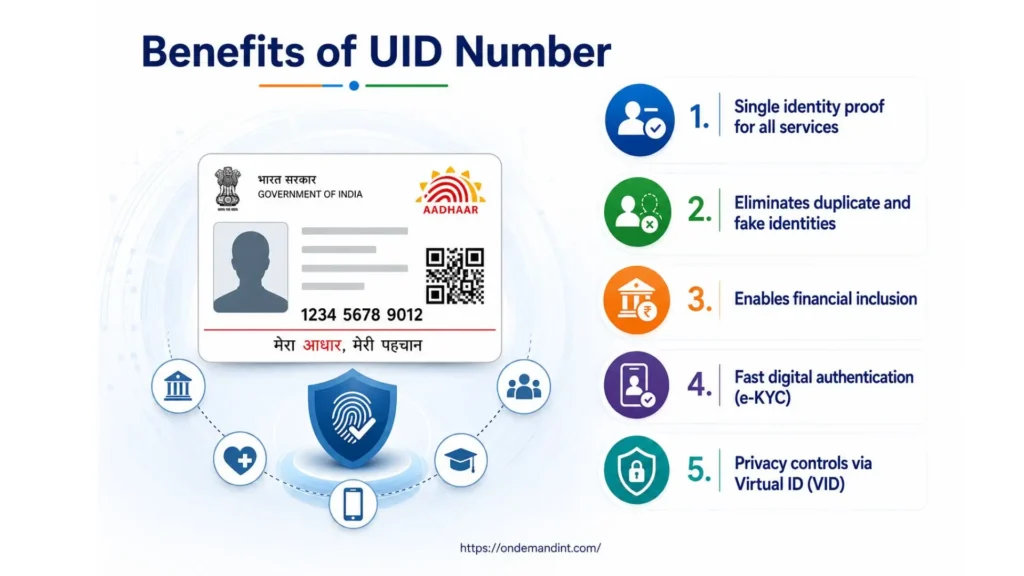
- Single identity proof for all services: Aadhaar serves as universally accepted proof of identity and address — accepted by banks, telecom providers, government portals, and private institutions across India. One document replaces the need for multiple identity proofs.
- Eliminates duplicate and fake identities: Each UID is biometrically linked to a unique individual. This prevents duplication, ghost beneficiaries in welfare schemes, and identity fraud — critical for India’s public distribution systems.
- Enables financial inclusion: Aadhaar allows individuals without traditional documents to open bank accounts, access credit, and receive government subsidies through Direct Benefit Transfer (DBT). It is the primary gateway to formal financial services for millions of underbanked citizens.
- Fast digital authentication (e-KYC): Businesses, banks, and government agencies can verify a person’s identity in seconds using Aadhaar-based e-KYC — eliminating paperwork, reducing processing time, and cutting verification costs.
- Privacy controls via Virtual ID (VID): Aadhaar holders can generate a 16-digit Virtual ID instead of sharing their actual Aadhaar number, protecting privacy while still completing authentication.
Read More: e-RUPI
UID Number Examples: UID, EID & VID Explained
When dealing with Aadhaar, there are three identifiers you need to know:
- UID (Unique Identification Number): Your 12-digit Aadhaar number. Permanently assigned. Used for authentication across all services.
- EID (Enrolment ID): A 28-digit number given at the time of Aadhaar enrolment. Used to track application status or retrieve your UID if you haven’t received your card yet.
- VID (Virtual ID): A 16-digit temporary number you can generate yourself at any time via the UIDAI portal. Use this instead of your actual Aadhaar number when you want to protect your privacy during authentication.
How To Retrieve lost Aadhaar UID & EID Numbers?
If you lose your Aadhaar details and want to recover your UID number or EID number, UIDAI provides an official online retrieval facility through the MyAadhaar portal.
Steps on how to retrieve lost Aadhaar UID & EID number, are as follows:
- Step 1: Go to the official portal — https://myaadhaar.uidai.gov.in/
- Step 2: Click on “Retrieve Lost UID/EID” under Aadhaar Services.
- Step 3: Select whether you want to retrieve your Aadhaar Number (UID) or your Enrolment ID (EID).
- Step 4: Enter your full name, registered mobile number or email address, and complete the captcha verification.
- Step 5: Click “Send OTP” and enter the OTP received on your registered mobile number.
- Step 6: Your UID or EID will be sent to your registered mobile number or email address.
Note: You must have access to the mobile number registered with your Aadhaar. If your mobile number is not registered or has changed, you must visit your nearest Aadhaar Seva Kendra in person.
Steps to Download the e-Aadhaar Card
The e-Aadhaar is a digitally signed electronic version of your Aadhaar card issued by UIDAI. Residents can download their Aadhaar using their UID number, Enrolment ID (EID), or Virtual ID (VID).
Method 1: Download using Aadhaar Number
Step 1: Visit https://myaadhaar.uidai.gov.in/
Step 2: Click “Download Aadhaar” under the My Aadhaar Services section on the homepage.
Step 3: Enter your 12-digit Aadhaar number and complete the captcha code shown on screen.
Step 4: Click “Send OTP” — a one-time password will be sent to your registered mobile number.
Step 5: Enter the OTP and click “Verify & Download.”
Step 6: A password-protected PDF will download to your device.
PDF Password format: First 4 letters of your name in CAPITALS + Year of Birth. Example: Name = Rahul, Year of Birth = 1990 → Password = RAHU1990
Method 2: Download using Enrolment ID (EID)
Step 1: Visit https://myaadhaar.uidai.gov.in/genricDownloadAadhaar
Step 2: Select “Enrolment ID (EID)” as your identifier.
Step 3: Enter your 28-digit EID from your enrolment acknowledgement slip, complete the captcha, and click “Send OTP.”
Step 4: Enter the OTP received on your registered mobile number.
Step 5: Click “Verify & Download” to get your e-Aadhaar PDF.
Difference Between UID, IUID & UII
UID (Unique Identification Number)
- A broad term referring to any system that assigns a unique identifier to an item.
- Often used interchangeably with IUID, but less specific.
IUID (Item Unique Identification)
- A specific DoD system for establishing globally unique and unambiguous identifiers for items.
- Focuses on improving traceability and management of property.
- Involves marking items with a physical identifier (UID label) and registering the item in a database.
UII (Unique Item Identifier)
- The actual data content encoded in the UID label or the digital representation of that data.
- It’s the core piece of information that differentiates one item from another.
- Must be globally unique and unambiguous.
Read More: Trademark Registration in India
UID Regional Headquarters and Offices
UIDAI Headquarters: Bangla Sahib Road, Behind Kali Mandir, Gole Market, New Delhi – 110001
UIDAI Helpline: 1947 (toll-free, available in multiple Indian languages)
Email: [email protected]
Regional Offices:
| Region | City | Jurisdiction |
|---|---|---|
| Regional Office Delhi | New Delhi | Delhi, Haryana, Himachal Pradesh, J&K, Punjab, Rajasthan, Uttarakhand |
| Regional Office Mumbai | Mumbai | Maharashtra, Goa, Gujarat, Dadra & Nagar Haveli |
| Regional Office Bengaluru | Bengaluru | Karnataka, Tamil Nadu, Kerala, Andhra Pradesh, Telangana |
| Regional Office Lucknow | Lucknow | Uttar Pradesh, Madhya Pradesh, Chhattisgarh |
| Regional Office Chandigarh | Chandigarh | Punjab, Haryana, HP, J&K (shared with Delhi RO) |
| Regional Office Hyderabad | Hyderabad | Telangana, Andhra Pradesh |
| Regional Office Ranchi | Ranchi | Jharkhand, Bihar, Odisha, West Bengal |
| Regional Office Guwahati | Guwahati | Assam and all Northeast states |
Conclusion
The UID number has become one of the most important components of India’s digital identity ecosystem. Whether you are opening a bank account, applying for government schemes, completing e-KYC verification, or accessing online services, the Aadhaar UID number simplifies authentication and identity verification across India.
Understanding the UID full form, UID number meaning, and where the UID number is located in the Aadhaar card is essential for residents using digital and government services today.
As India continues expanding its digital infrastructure, UIDAI and Aadhaar-based authentication systems will continue playing a central role in secure identity verification and financial inclusion. Get Free Consultation Today.
FAQ’s
Is the UID number the same as the Aadhaar number?
Yes. The UID number and Aadhaar number are the same thing — both refer to the unique 12-digit identifier issued by UIDAI to every enrolled Indian resident. “UID” is the technical term used by the government; “Aadhaar” is the public-facing name of the same number.
How can I find my UID number without my Aadhaar card?
Visit https://myaadhaar.uidai.gov.in/ and click “Retrieve Lost UID/EID.” Enter your name and registered mobile number, verify via OTP, and your UID will be sent to your registered mobile or email. You must have access to the mobile number registered with your Aadhaar.
How do I check which mobile number is linked to my Aadhaar?
Visit https://myaadhaar.uidai.gov.in/ and select “Verify Email/Mobile Number.” Enter your Aadhaar number and the mobile number you want to verify. The system will confirm whether that number is registered with your Aadhaar.
What is UIDAI?
UIDAI stands for Unique Identification Authority of India, the government authority responsible for issuing Aadhaar numbers.